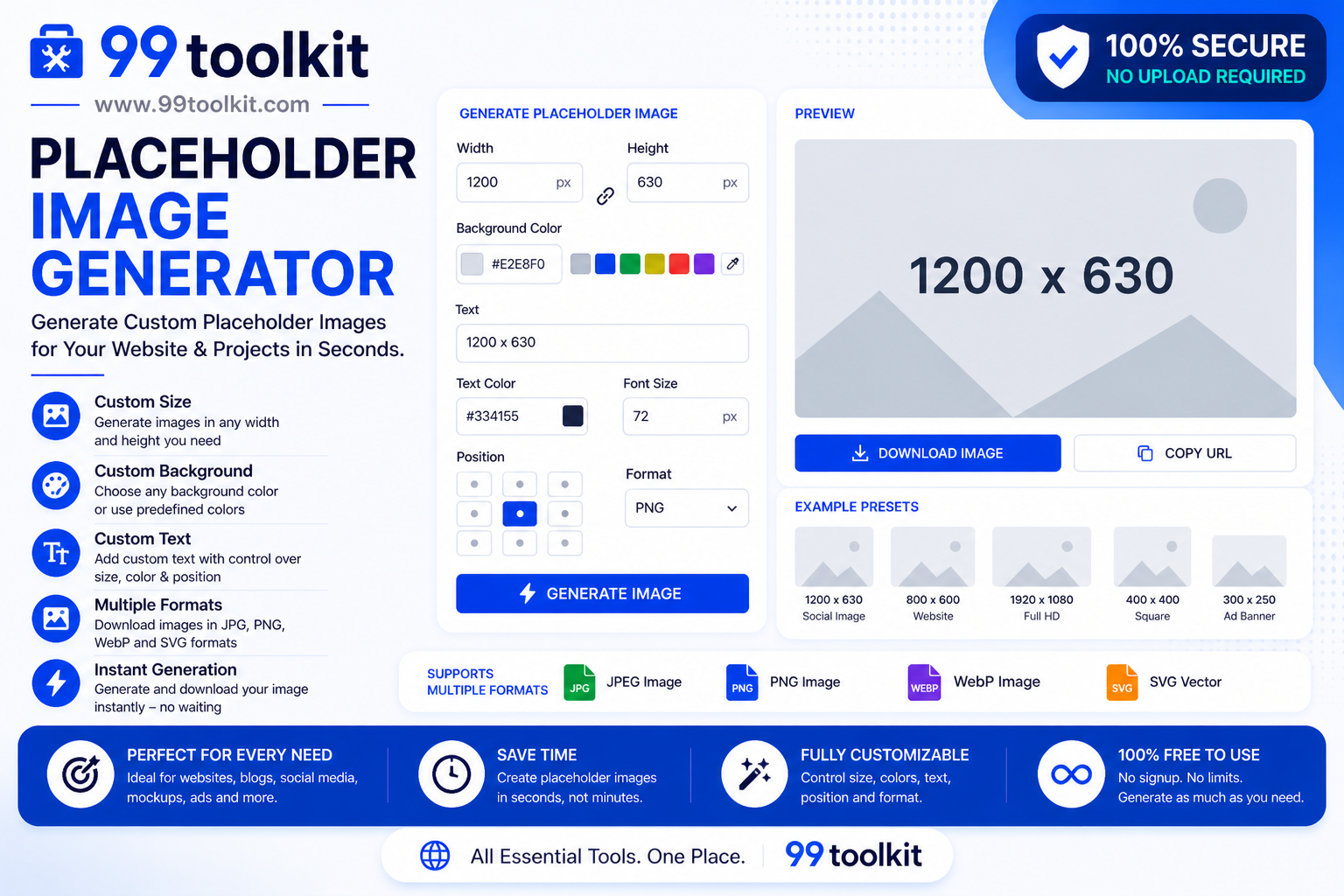
When building a website or designing a new layout, you rarely have all the final assets ready from day one. You might be waiting on a photographer, a graphic designer, or client approval. In the past, developers would manually open Photoshop, create a gray box, add text denoting the size, save it, and upload it to the server just to test a layout. This was a massive waste of time. Today, a placeholder image generator solves this problem instantly.
In this guide, we will explore what dummy images are, how they speed up the web development process, and how you can use 99toolkit to generate placeholder graphics on the fly.
What is a Placeholder Image Generator?
A placeholder image generator is an online utility that creates dummy images dynamically via a simple URL. Instead of hosting a physical image file on your server, you insert a specific link into your HTML <img> tag. The generator’s server intercepts that link and instantly serves an image of the exact dimensions requested.
These dummy images usually feature a solid background color with text in the center displaying the image’s dimensions (e.g., “800×600”). This allows developers and designers to build out grid layouts, test responsiveness, and visualize page structures without needing actual content.
Key Features of the 99toolkit Placeholder Generator
Our dummy image tool is built for speed and customization. Here is what you can do with it:
- Instant URL Generation: No downloading required. Just copy the generated URL directly into your code.
- Custom Dimensions: Specify any width and height you need, from tiny 16×16 icons to massive 4K hero banners.
- Color Customization: Change the background and text colors to match your brand’s wireframe style.
- Custom Text: Override the default dimension text to label your placeholders (e.g., “Product Hero” or “Author Avatar”).
- Format Options: Generate your dummy images in various formats including PNG, JPG, or GIF depending on your testing needs.
How to Use the Placeholder Image Generator (Step-by-Step)
Using 99toolkit to generate placeholder assets takes mere seconds:
- Set the Size: Enter the required width and height in pixels (e.g., 600 for width, 400 for height).
- Choose Colors: Select a background color and a text color using hex codes (or keep the default gray and white).
- Add Custom Text (Optional): If you want the image to say something specific instead of just the dimensions, type it into the text field.
- Copy the URL: The tool will generate a link. Copy this link.
- Paste into HTML: Insert the link into the src attribute of your image tag.
Why Use Dummy Images? (The Benefits)
Integrating a placeholder generator into your web workflow offers significant advantages:
- Maintains Workflow Momentum: Never let missing assets stop your coding progress. You can build the entire frontend architecture while waiting for the media team.
- Prevents Broken Layouts: Empty image tags can cause surrounding HTML elements to collapse. Placeholders force the browser to respect the intended grid space.
- Saves Server Storage: You do not need to clutter your project folders or Git repositories with dozens of temporary “temp.jpg” files.
- Improves Client Presentations: Presenting a wireframe with neat, clearly labeled placeholders looks vastly more professional than a page full of broken image icons.
Real-Life Use Cases
Who utilizes dummy images on a daily basis?
Frontend Developers: When building out CSS Grid or Flexbox gallery layouts, developers use dummy URLs of varying ratios to ensure the code handles different image sizes gracefully.
WordPress Theme Creators: Theme developers use placeholders in their demo content so that when a user installs the theme, they can easily see where their own images should go.
UI/UX Prototypers: During the low-fidelity wireframing stage, designers use gray dummy images to establish visual hierarchy before committing to specific photography.
Tips for Best Results
Get the most out of your placeholders with these professional tips:
- Test Edge Cases: Don’t just use standard sizes. Generate extremely tall or extremely wide dummy images to see if your CSS object-fit properties are working correctly.
- Use Brand Colors: If you are presenting a wireframe to a client, customize the placeholder background colors to match the client’s brand palette to make it feel more personalized.
- Label Everything: Use the custom text feature to clearly indicate what the image is for, such as “Primary Logo” or “Sidebar Ad Unit.”
Common Mistakes to Avoid
Watch out for these minor pitfalls when using dummy images:
- Forgetting to Replace Them: It sounds obvious, but always double-check your code before launching to production. Accidentally pushing dummy URLs to a live site looks highly unprofessional.
- Testing Performance with Placeholders: Dummy images are highly compressed and load instantly. Do not use them to gauge your site’s actual loading speed. Use real, optimized images for performance testing.
When you finally get the real images, make sure to optimize them using our Image Compressor and Image Resizer before uploading them to your server.
FAQs
1. Do dummy image links expire?
No, the URLs generated by robust placeholder services are designed to be permanent, meaning they will not randomly break during your development cycle.
2. Can I use these placeholders for commercial client projects?
Absolutely. Placeholder generators are utilities meant to aid development. You can freely use them in client prototypes, themes, and templates.
3. Are placeholder images responsive?
The image itself has fixed dimensions, but it will respond to your CSS just like a normal image. If you apply CSS width rules, the dummy image will scale fluidly within its container.
4. Does using external placeholder URLs slow down local development?
Because the dummy images are incredibly small in file size and served via high-speed networks, the impact on your local development environment is virtually zero.
5. Is the 99toolkit placeholder generator free?
Yes! You can generate as many dummy image URLs as you need for your web projects completely free of charge.
Conclusion
A placeholder image generator is a simple tool that solves a massive development headache. By allowing you to bypass missing assets and focus purely on layout and structure, dummy URLs keep your projects moving forward.
Speed up your prototyping phase today by bookmarking the free placeholder image tool on 99toolkit. Build faster, test thoroughly, and present cleaner wireframes!