Look at almost any modern website, and you will see triangles everywhere. They are used as directional arrows on dropdown menus, pointers on tooltip speech bubbles, and navigational indicators on image carousels. But if you look at standard HTML, there is no <triangle> tag. In the past, designers had to use tiny, transparent PNG images to create these shapes, which slowed down the website and looked blurry on high-resolution screens. Today, frontend developers use pure CSS to hack the border property and create mathematically perfect shapes. However, writing that code by hand is confusing. That is where a CSS Triangle Generator becomes a massive time-saver.
In this guide, we will explain the clever CSS trick behind building triangles, why you should stop using images for UI shapes, and how the free 99toolkit generator can give you the exact code you need in seconds.
What is a CSS Triangle Generator?
A CSS Triangle Generator is an interactive coding tool that outputs the specific CSS border properties required to render a triangle on a webpage.
The CSS Triangle Hack works by taking a standard HTML block element (like a <div>), setting its width and height to zero, and applying extremely thick borders. Because CSS borders meet at an angle, making three of the borders transparent and coloring the fourth border results in a perfect, solid triangle. A generator allows you to visually pick the direction, size, and color, and it does the complex border-width math for you.
Key Features of the 99toolkit Triangle Generator
Our generator removes the guesswork from UI styling. Here is what it offers:
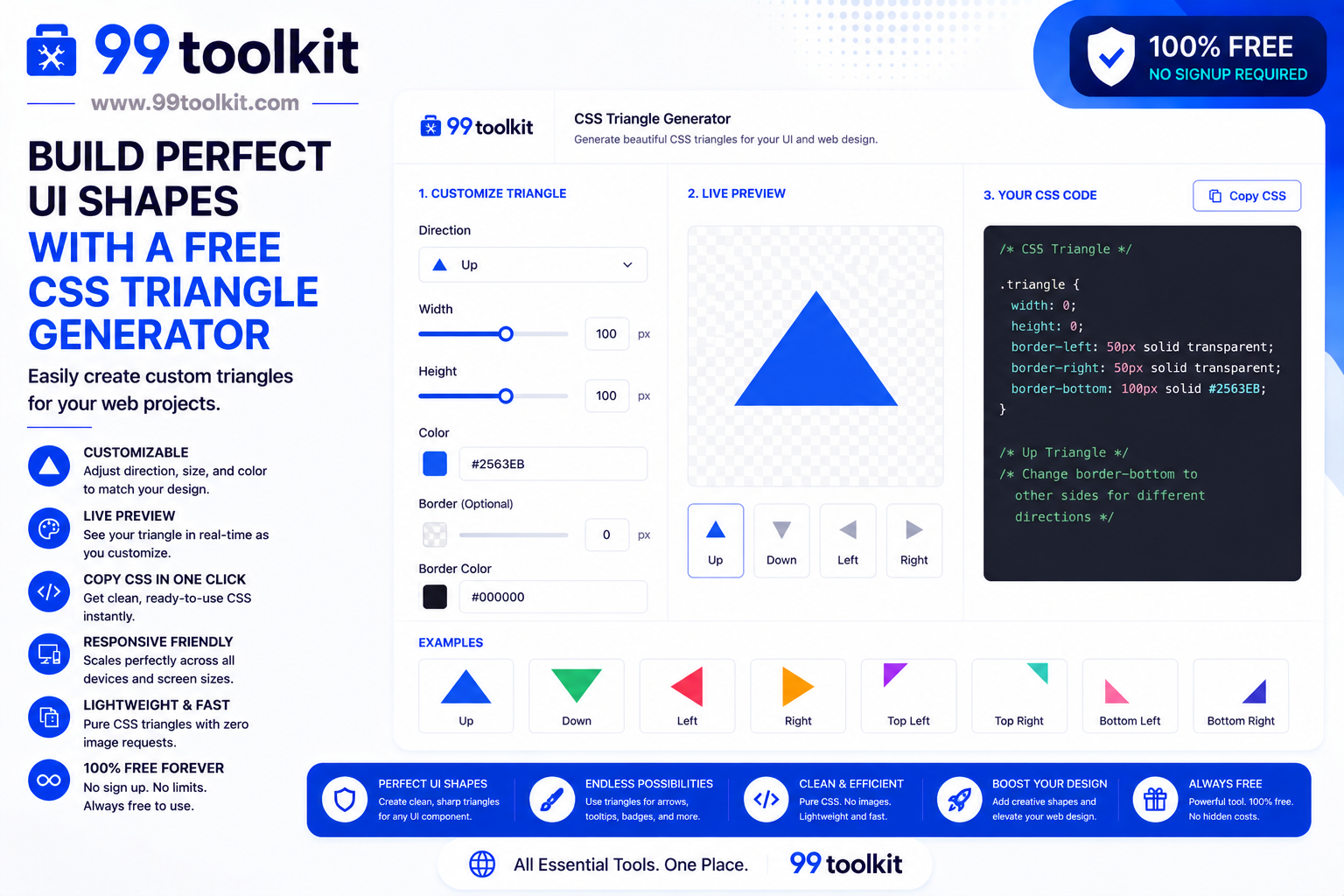
- Directional Control: Easily choose the direction your triangle should point: Up, Down, Left, Right, or even diagonal corners (Top-Left, Bottom-Right, etc.).
- Size Customization: Adjust the width and height independently to create equilateral triangles, sharp narrow arrows, or wide, flat indicators.
- Live Color Picker: Select the exact HEX or RGB color you need to match your website’s theme perfectly.
- Instant Preview: Watch the triangle change shape in real-time on a digital canvas as you adjust the settings.
- Clean CSS Output: Instantly copy the minimal, cross-browser compatible CSS code to paste directly into your project.
How to Use the CSS Triangle Generator (Step-by-Step)
Creating a directional arrow takes just three steps:
- Choose the Direction: Click on one of the directional arrows to set where the point of the triangle should aim.
- Adjust the Size: Use the sliders or input boxes to change the width and height. Notice how changing the width on a point-up triangle changes how wide the base is.
- Select a Color: Use the color picker to set the fill color.
- Copy the Code: Once the preview looks perfect, click the copy button. You will get a CSS class that you can apply to any empty <div> or <span>.
Why Use Pure CSS for Triangles? (The Benefits)
Why write complex border hacks instead of just using an icon or an image? The benefits are entirely related to performance and responsiveness:
- Zero File Size: An image requires an HTTP request to the server, which takes time. A CSS triangle is just a few lines of text that the browser renders instantly natively.
- Infinite Scalability: Unlike a JPG or PNG, a CSS triangle is drawn by the browser using vectors. It will look perfectly crisp on an old monitor and razor-sharp on a 4K Retina display.
- Easy Animation: Because it is just CSS, you can easily add a transition property. For example, when a user hovers over an accordion menu, you can animate the CSS to make the triangle spin from pointing right to pointing down.
- Dynamic Color Changes: If you use an image, changing the color for Dark Mode requires uploading a second image. With CSS, you simply write @media (prefers-color-scheme: dark) and change the border-color property.
Real-Life Use Cases
Where are CSS triangles used in modern web development?
Dropdown Menus: Look at the navigation bar of almost any SaaS website. The small arrow indicating that a menu will drop down when clicked is almost always a CSS triangle.
Tooltips and Popovers: When you hover over an information icon and a dark box appears with text, the little tail connecting the box to the icon is a CSS triangle placed absolutely.
Chat Interfaces: The speech bubbles in messaging apps (like WhatsApp Web or iMessage) use small CSS triangles attached to the side of a rounded rectangle to indicate who is speaking.
Tips for Best Results
Master advanced UI styling with these developer tips:
- Use Pseudo-elements: Instead of cluttering your HTML with empty div tags, use the ::before or ::after pseudo-elements in CSS. You can attach a triangle directly to an existing button or tooltip this way.
- Use ‘CurrentColor’: If you want the triangle to always match the color of the text next to it, set the border-color to the CSS variable currentColor. If the text color changes on hover, the triangle will change with it automatically.
Common Mistakes to Avoid
Avoid these minor visual bugs:
- Forgetting Width and Height Zero: The entire hack relies on width: 0; height: 0;. If you forget these, the browser will render a massive, ugly, multi-colored square instead of a triangle.
- Improper Positioning: When attaching a triangle to a tooltip, you must use position: absolute; on the triangle and position: relative; on the parent container, otherwise, the triangle will break the page layout.
If you want to add a beautiful gradient to the background of your webpage, use our CSS Gradient Generator. If you want to make the parent container look like a 3D card, use our Box Shadow Generator.
FAQs
1. Do CSS triangles work on mobile browsers?
Yes. The border-hack method is one of the oldest and most reliable CSS tricks in existence. It has 100% support across all browsers, including ancient versions of Internet Explorer.
2. Can I put text inside a CSS triangle?
No. Because the triangle is created using borders on an element with zero width and height, any text placed inside the HTML tag will overflow and look completely broken.
3. Can I put a box-shadow on a CSS triangle?
Standard box-shadow will apply to the square bounding box, which looks wrong. To put a shadow on a CSS triangle, you must use the CSS filter: drop-shadow() property instead.
4. Is SVG better than CSS triangles?
SVG (Scalable Vector Graphics) is better for highly complex, multi-colored shapes. But for simple, solid-colored directional arrows, CSS triangles require less code and are easier to manipulate dynamically.
5. Is the 99toolkit CSS triangle generator free?
Yes. Our interactive CSS code generator is completely free for all personal and commercial development projects.
Conclusion
The best web developers write clean, lightweight code. Replacing heavy image files with native CSS shapes is a fundamental step in optimizing your website’s performance and scalability.
Stop doing complex geometry in your head. Bookmark the free CSS Triangle Generator on 99toolkit today, craft perfect UI directional elements visually, and keep your frontend code razor-sharp.