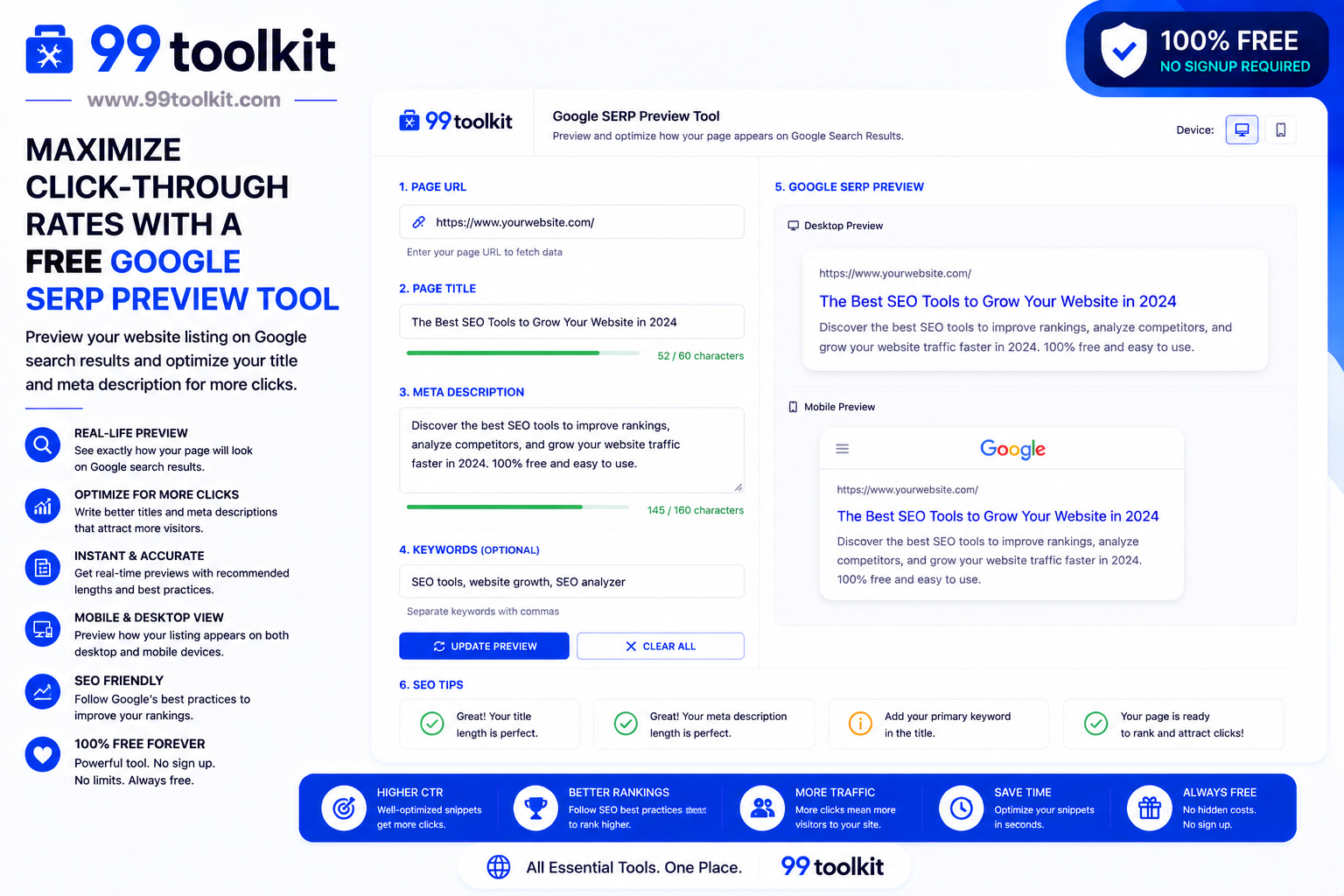
You have spent hours writing the perfect blog post and carefully selecting your target keywords. Your content is finally ranking on the first page of Google! But there is a problem: nobody is clicking on it. When you search for your article, you realize your title is cut off halfway through, and your meta description is just a random, out-of-context sentence pulled from your sidebar. In the highly competitive world of Search Engine Optimization (SEO), your search snippet is your only chance to make a first impression. To ensure it looks perfect before you hit publish, you need a Google SERP Preview Tool.
In this guide, we will explore what the Search Engine Results Page (SERP) is, why optimizing your snippet is crucial for organic traffic, and how you can use the free SERP visualizer on 99toolkit to perfectly craft your metadata.
What is a Google SERP Preview Tool?
A Google SERP Preview Tool is a visual SEO utility that simulates exactly how your webpage will appear in Google’s search results.
Google has strict pixel limits on how much text it will display in the search results. If your title is too long, Google will truncate it with an ugly ellipsis (…). If your description is too short, Google might ignore it entirely and pull random text from your page. A preview tool allows you to type in your Title Tag, Meta Description, and URL, and instantly displays a live, pixel-perfect mockup of the search snippet on both desktop and mobile views.
Key Features of the 99toolkit SERP Preview Tool
Our visualizer is designed to take the guesswork out of your on-page SEO. Here is what makes it essential:
- Live Visual Mockup: Watch your Google snippet update in real-time as you type, exactly as it would appear on a live search results page.
- Accurate Pixel Counting: Unlike older tools that simply count characters, our tool counts the actual pixel width of each letter (because an ‘i’ takes up much less space than a ‘w’), ensuring 100% accuracy against Google’s truncation limits.
- Mobile and Desktop Views: Toggle seamlessly between how your snippet will look on a large computer monitor versus a smartphone screen.
- Keyword Boldification: Enter your target keyword, and the tool will automatically bold it within your description, mimicking Google’s behavior and helping you assess visual impact.
- Date Injection: Add a published date to your preview to see how the extra characters affect your overall description length.
How to Use the SERP Preview Tool (Step-by-Step)
Crafting the perfect search snippet takes less than a minute. Follow these steps:
- Enter Your Title Tag: Type your desired SEO headline into the Title field. Keep an eye on the progress bar; aim to keep it in the green zone (around 50-60 characters or 580 pixels).
- Enter Your URL: Paste the exact link to your page. Google will display this right above your title.
- Write Your Meta Description: Craft a compelling 1-to-2 sentence summary of your page. The progress bar will warn you if you exceed the mobile limit (around 120 characters) or the desktop limit (around 155 characters).
- Review the Mockup: Look at the visual preview. Is the title punchy? Does the description end cleanly without being cut off?
- Copy Your Data: Once it looks perfect, copy the text and paste it into your website’s CMS (like WordPress or Webflow) or hand it off to your development team.
Why SERP Optimization is Crucial (The Benefits)
Ranking high is only half the battle; getting the click is what actually drives revenue. Here is why SERP optimization matters:
- Skyrockets Click-Through Rate (CTR): A clean, compelling title that promises a specific answer will always steal clicks away from a messy, truncated title ranking above it.
- Improves Search Rankings: Google monitors how often users click your link compared to others. If your snippet has a high CTR, Google’s algorithm assumes your page is highly relevant and may bump you higher in the rankings.
- Prevents Wasted Space: If your description is truncated, you waste valuable real estate that could have been used for a strong Call-to-Action (like “Click here for 50% off!”).
Real-Life Use Cases
Who relies on a SERP visualizer every time they publish?
SEO Agencies and Consultants: When pitching on-page optimizations to a client, an agency will use the SERP tool to take screenshots of the Before (messy and cut off) and After (clean and optimized) to visually prove the value of their work.
Content Writers and Bloggers: As the final step before hitting Publish on a new article, professional bloggers run their proposed title and description through the tool to ensure maximum visibility.
E-commerce Managers: When launching a new product, managers use the tool to ensure critical buying information (like “Free Shipping” or the product price) is perfectly visible within the snippet before truncation happens.
Tips for Best Results
Write snippets that users simply cannot resist clicking with these expert tips:
- Front-Load Your Keyword: Always put your primary keyword as close to the beginning of your Title Tag as possible. Users scan results quickly; if they don’t see their keyword instantly, they will scroll past.
- Include a Call-to-Action (CTA): End your meta description with an active verb. Phrases like “Read the full guide,” “Shop now,” or “Learn more” psychologically prompt the user to click.
- Use Power Words and Numbers: Titles with numbers (e.g., “7 Ways to…”) or power words (e.g., “Ultimate,” “Proven,” “Free”) consistently outperform generic titles.
Common Mistakes to Avoid
Avoid these frequent SEO blunders:
- Keyword Stuffing: Writing a title like “Cheap Shoes | Buy Shoes | Best Shoes 2026” looks like spam. Users will not click it, and Google may penalize it. Write naturally for humans.
- Clickbaiting: Do not write a sensational meta description that promises information your page does not actually contain. The user will immediately leave your site (high bounce rate), which harms your SEO.
Need to generate the actual HTML code for your newly optimized snippet? Use our Meta Tag Generator. Want to see what users are searching for? Try the Keyword Suggestion Tool.
FAQs
1. Will Google always use the exact meta description I provide?
Not always. If Google believes a different sentence from your page better answers the user’s specific search query, it will dynamically overwrite your description. However, providing a highly relevant, perfectly sized description drastically increases the chances Google will use it.
2. What is the maximum length for a Title Tag?
The limit is based on pixels, not characters. Generally, you should aim for 55 to 60 characters. Anything longer runs a high risk of being truncated on desktop screens.
3. Why does my snippet look different on my phone than on my computer?
Mobile screens are much narrower. While Google allows slightly more vertical lines for descriptions on mobile, the horizontal space for titles is much tighter. Our tool allows you to check both formats.
4. Does a meta description directly impact ranking?
No, Google has explicitly stated that meta descriptions are not a direct ranking factor. However, they heavily influence Click-Through Rate (CTR), which IS a ranking signal.
5. Is the 99toolkit SERP Preview tool free?
Yes. You can visualize and perfect as many search snippets as you need completely free of charge.
Conclusion
Your search snippet is the digital storefront of your website. If the window display is messy, confusing, or broken, customers will simply walk to the store next door.
Take control of your first impression. Bookmark the free Google SERP Preview Tool on 99toolkit today, craft compelling, pixel-perfect metadata, and watch your organic click-through rates soar.